Best CNC and Laser Combo Units for Precise Woodworking and Engraving
Looking for a CNC and laser combo that blends cutting power with precise engraving? This guide highlights five top options that pair CNC routing with a capable laser module, aimed at hobbyists and small shops. Each pick is evaluated for who it’s best for, along with practical pros and a clear limitation to consider. Whether you’re upgrading a router bed or adding laser capabilities to a compact CNC, these choices cover a range of power, accuracy, and ease of integration.
Product Overview At A Glance
| Product | Best For | Key Benefit |
|---|---|---|
| Genmitsu Laser Engraver Module for CNC Router Machine | Woodworking and acrylic cutting enthusiasts | Ultra-fine 0.05 x 0.15 mm laser spot for detailed work |
| LASER TREE 4000mW Laser Engraver Module | DIYers needing adjustable focal laser head | Adjustable focal range supports varied materials |
| LASER TREE Laser Module, 10W | High-contrast engraving and cutting | 10W optical power with air assist and heat dissipation |
| Ortur Laser Master S2 | Compact, safe, projected hobbyists | Safety features and compact engraving area |
| Genmitsu PROVerXL 2X2 CNC Router With 10W Laser | Pro-level projects with a larger work area | 2×2 ft workspace with integrated 10W laser |
Genmitsu Laser Engraver Module for CNC Router

Best for upgrading a CNC router with a high-precision laser. This 10W optical power module is designed for compatibility with multiple Genmitsu machines, including 3020, 3030, 4040, and PRO variants. The laser spot measures 0.05 x 0.15 mm, enabling fine vector cuts and detailed raster engraving on patterns. An integrated control board reduces cable clutter and improves gantry stability, which helps maintain movement speed and accuracy during complex cuts.
Who it’s best for: woodworkers and acrylic cutters who want an integrated, lightweight laser upgrade on existing CNCs. Why selected: it pairs strong optical performance with streamlined integration, helping you achieve sharp detail without major redesigns. Limitation: as a Class 4 system, it requires careful handling and proper safety practices during operation.
LASER TREE 4000mW Laser Engraver Module
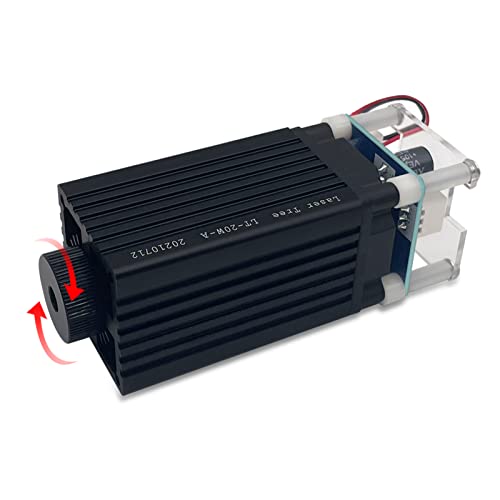
Best for DIY builders needing adjustable focus and a compact footprint. The module outputs 4W (4000 mW) with a 450nm diode and an adjustable focal range (20–50 mm). It can cut through 1–2 mm plywood in a single pass and supports 3-pin plug-and-play wiring with a compact 35x35x99.6 mm form factor. Its Class 1 rating adds a safety layer for home workshops, and the built-in focusing system supports reliable engraving on wood and leather.
Who it’s best for: hobbyists seeking a budget-friendly, adjustable-locus laser upgrade for light-to-moderate cutting tasks. Why selected: the adjustable focal head and integration simplicity make it versatile for different material thicknesses. Limitation: performance is best with thinner stock; thicker materials may require slower speeds or multiple passes.
LASER TREE Laser Module, 10W (10000mW)

Best for heavy-duty engraving and cutting on a variety of materials. This 10W optical laser module features built-in air assist, a built-in FAC, and a double ultra-fine compressed spot. It claims strong cutting ability, such as cutting through 8 mm plywood at 1.5 mm/s with a 45 mm focus. The module includes a built-in cooling and heat dissipation design to maintain performance during longer sessions.
Who it’s best for: users needing robust performance for faster material removal and cleaner edges. Why selected: high power and integrated cooling make it a strong option for larger projects. Limitation: higher power often demands stricter safety controls and ventilation in smaller spaces.
Ortur Laser Master S2 LU2-2

Best for compact setups needing strong safety features. The Ortur Laser Master S2 offers a 2100 mW laser with a 390×410 mm engraving area. It includes a 32-bit motherboard, a G-sensor for auto-stop on displacement, and a panoramic protective cover to guard eyes from UV exposure. The device emphasizes safety and ease of use for beginners moving toward more ambitious laser projects.
Who it’s best for: hobbyists prioritizing safety and a larger engraving area in a compact form. Why selected: the integrated safety features help new users operate with reduced risk. Limitation: engraving area is smaller than some pro-level machines, potentially limiting very large parts.
Genmitsu PROVerXL 2X2 With 10W Laser

Best for professional-scale projects with a larger work area. The PROVerXL 2X2 includes a 2×2 ft workspace, a 710 W spindle, closed-loop motors, and built-in Wi-Fi with Genmitsu App support. The 10W laser module upgrades the machine’s capabilities for wood and metal engraving and light cutting. The design supports online connectivity and offline controllers, enabling batch production and scalable workflows.
Who it’s best for: serious makers and small shops needing a robust combination of CNC machining and laser finishing in a single system. Why selected: the large working envelope and expandable ecosystem improve production potential. Limitation: larger footprint means more space is required and setup is more complex than compact units.
Buying Guide: Key Considerations For A CNC And Laser Combo
- Work Area And Gantry: Choose a machine size that matches your typical projects. A 2×2 ft or larger work area supports furniture pieces and signage, while smaller formats suit hobby projects.
- Laser Power And Material Compatibility: Higher wattage enables deeper cuts and faster engraving but increases safety requirements. Assess the thickest material you plan to work with and select a compatible laser power.
- Safety Features: Look for enclosure options, automatic shutoffs, protective glasses or covers, and air assist to manage fumes and lens cleanliness.
- Integrated Control And Connectivity: Built-in Wi-Fi, offline controllers, and app ecosystems simplify batch processing and remote operation.
- Cooling And Durability: Air cooling vs. active cooling matters for continuous runs. Consider heat dissipation when running hours of engraving or cutting.
- Ease of Upgrade and Compatibility: Some modules are designed for specific CNC models. Verify compatibility with your existing machine and higher-end accessories like rotary attachments.
- Maintenance And Spare Parts: Availability of replacement diodes, lenses, and connectors affects long-term costs and downtime.
FAQ
- What is a CNC and laser combo best used for?
They enable precise material removal and detailed engraving on wood, acrylic, leather, and other materials, combining routing with laser finishing for versatile projects.
- Is a higher laser wattage always better?
Higher wattage cuts thicker materials and engraves faster, but it also requires more power handling, cooling, and safety precautions.
- Do these modules fit all CNC routers?
Many modules are designed for specific families or mounting patterns. Always verify compatibility with your machine’s spindle type and mounting brackets.
- Are air assist and lens protection important?
Yes. Air assist reduces smoke buildup and improves edge quality, while protective features help maintain laser lens clarity and safety.
- Can I upgrade my current CNC with a laser module?
Several options are designed as add-ons for existing CNCs, but confirm mechanical fit and wiring compatibility before purchasing.
- Which product is best for beginners?
Ortur Laser Master S2 offers a balanced entry point with safety features and a reasonable engraving area for learning and small projects.