Best Industrial LCD Touch Screens for Tough Environments
Answering buyers who need durable, reliable touch displays for industrial or outdoor settings, the following five selections offer rugged interfaces, touch robustness, and multiple video inputs. They are suited for factory kiosks, control rooms, outdoor signage, or machine dashboards. The table below highlights key specs to compare at a glance.
| Product | Screen Size | Touch Points | Best For |
|---|---|---|---|
| GreenTouch 10.1″ Front Waterproof Open Frame PCAP | 10.1 inches | 10-point | Front-dirty or wet environments; PCI/OPC panels |
| GreenTouch 23.8″ Open Frame PCAP | 23.8 inches | 10-point | Mid-to-large kiosks and control interfaces |
| VSDISPLAY 12.1″ Industrial LCD | 12.1 inches | 10-point | Compact control panels and compact machines |
| VSDISPLAY 15″ Outdoor Industrial | 15 inches | 10-point | Bright outdoor signage and sun-exposed locations |
| GrenTouch 21.5″ Aluminum Industrial Touchscreen | 21.5 inches | Up to 10-point PCAP | Robust, durable kiosks and retail/industrial apps |
GreenTouch 10.1 Inch Front Waterproof PCAP
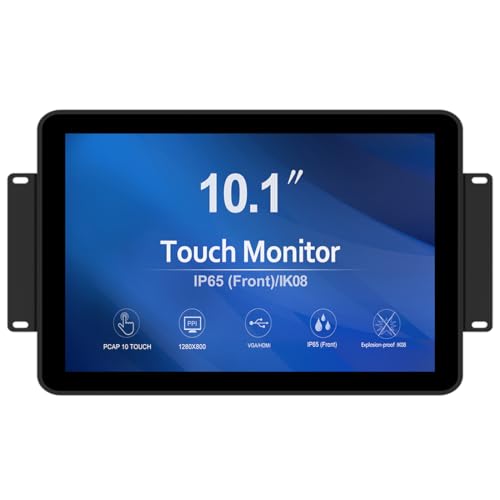
Best for compact spaces where dirt, dust, or moisture are concerns. This 10.1-inch display uses a G+G 10-point PCAP touch system and a 3mm tempered cover glass, delivering solid optical clarity and durability. It is sealed to resist dust and liquids and meets front IP65 water-resistance requirements, making it suitable for manufacturing stations or entry kiosks. Interfaces include HDMI, VGA, DVI, and Audio, offering flexible integration. Choose this if you need a small, rugged touch screen with multi-video inputs and front protection. A caution: limited screen real estate may constrain complex UI layouts.
GreenTouch 23.8 Inch Open Frame PCAP

This 23.8-inch open-frame PCAP display is designed for larger interactive setups such as kiosks or control-room panels. It shares robust touch accuracy with 10-point multi-touch and a sealed front suitable for challenging environments. With HDMI, VGA, DVI, and Audio, it supports a wide range of professional applications. Best for scale-up applications where screen real estate and touch precision are essential. Limitation: larger footprint may require more mounting space and cooling considerations.
VSDISPLAY 12.1 Inch Industrial LCD

Ideal for space-constrained panels, this 12.1-inch 1024×768 touch display provides 10-point touch with quick response. It offers VGA and DVI inputs, plus mounting options with 75x75mm and 100x100mm patterns. Best for compact industrial consoles or machine panels where a reliable, multi-touch interface is needed. A caveat: may require external power or integration planning for full feature use, depending on the host system.
VSDISPLAY 15 Inch Outdoor Industrial

Designed for high-brightness outdoor use, this 15-inch display delivers 1000 nits and 1000:1 contrast, supporting VGA and DVI inputs. Its IPS panel provides wide viewing angles, making it suitable for sunlit environments like outdoor kiosks or warehouse yards. Best for outdoor industrial signage or field operations where visibility is critical. Limitation: outdoor brightness helps readability, but bezel and enclosure considerations are needed for complete weatherproofing.
GrenTouch 21.5 Inch Aluminum Monitor

Made with an aluminum frame, this 21.5-inch display blends durability with a professional look. It supports up to 10 touch points via PCAP, making it suitable for interactive kiosks, POS systems, and heavy-use industrial interfaces. Interfaces include HDMI, VGA, DVI, and Audio, enabling easy integration into existing hardware. Best for robust, mid-to-large-scale applications where a sturdy enclosure is important. Limitation: may require sturdy mounting and appropriate enclosure for the full outdoor or harsh-environment use cases.
Buying Guide
What to consider when choosing an industrial LCD touch screen:
- Screen size and form factor: Balance required workspace with visibility and multitouch needs.
- Touch technology: PCAP with 10-point touch provides responsive interactions; ensure compatibility with your OS and drivers.
- Durability and sealing: Front IP ratings and vandal resistance matter in dusty, wet, or public-facing environments.
- Video inputs: Multiple interfaces (HDMI, VGA, DVI) simplify integration with existing hardware.
- Brightness and contrast: Outdoor or bright indoor settings benefit from high-nit displays and IPS panels.
- Mounting and enclosure: Open-frame designs require sturdy mounting; consider enclosure solutions for harsh environments.
FAQ
- What is PCAP touch and why is it common in industrial screens?
It stands for projected-capacitance touch, enabling accurate multi-touch input and durable operation in demanding settings. - Are these screens suitable for outdoor use?
Several models offer high brightness and IP-rated front protection; verify enclosure and weatherproofing for each installation. - Do these displays work with Raspberry Pi or Windows devices?
Many models support common interfaces (HDMI, USB) and are compatible with Windows, Linux, and single-board computers when used as monitors with inputs. - What mounting options should I plan for?
Open-frame boxes often require VESA or 75×75/100x100mm patterns; specify mounting hardware and environmental protection in advance. - What is the importance of a wide viewing angle?
IPS panels and wide viewing angles improve visibility from multiple positions, reducing glare and dead spots in busy work areas. - What kind of power considerations exist?
Some portable models use USB power or require external power adapters; confirm power requirements for your setup.