Best Industrial Panel PC Touch Solutions for Modern Operations
The demand for rugged, reliable touch panel PCs spans kiosks, factory automation, digital signage, and smart environments. This guide highlights five top industrial panel PCs that balance durability, performance, and ease of integration. Each option includes IP ratings, capacitive touch, multiple I/O, and Windows compatibility to support demanding industrial workflows.
| Product | Brand | Display | Touch | OS | Key I/O |
|---|---|---|---|---|---|
| NORQIN 21.5″ Embedded Panel PC | NORQIN | 21.5″ FHD | 10-point capacitive | Windows | USB, HDMI, 6× COM, 2× LAN, WiFi |
| ONERugged 10.1″ Panel PC | ONERugged | 10.1″ | 10-point capacitive | Windows 11 Pro | 2× USB 3.0, HDMI, 2× RS232, 2× LAN, BT/WiFi |
| MAGEX 15.6″ Touchscreen Monitor | MAGEX | 15.6″ FHD | 10-point | Not specified (PC-ready) | HDMI, VGA, DVI, USB-B touch, USB, HDMI |
| SunKol 15″ Industrial Embedded Panel PC | SunKol | 15″ | 10-point capacitive | Windows 10 Pro | 2× LAN, HDMI, 6× USB, RS485/RS232 |
| NORQIN 12.1″ Embedded Panel PC | NORQIN | 12.1″ | 10-point capacitive | Windows | USB, HDMI, 6× COM, LAN×2 |
Note: All entries listed are designed for tough environments with IP65 front panels, 24/7 operation potential, and flexible OS options to support kiosk, automation, and industrial control tasks.
NORQIN 21.5-Inch Embedded Panel PC

NORQIN’s 21.5-inch all-in-one industrial panel PC offers an IP65-rated front panel with a capacitive 10-point touch surface, ideal for harsh environments. It runs Windows out of the box and can support Linux or other platforms via optional custom configurations. The system is built for 24/7 operation and combines a robust processor with reliable I/O options including multiple USB ports, HDMI, COM interfaces, and dual LAN connectivity, making it suitable for kiosks, factory automation, digital signage, and smart factory deployments.
ONERugged 10.1-Inch Industrial Panel PC P10J

The ONERugged P10J combines a compact 10.1-inch form factor with a durable IP65 touch panel. It features a 10-point capacitive G+G touch screen and Windows 11 Pro, designed for compact deployments in industrial and commercial settings. Rich interfaces include multiple COM ports, USB 3.0, HDMI, dual Ethernet, and wireless options. A fanless design and aluminum back housing support quiet operation and effective heat management in demanding environments.
MAGEX 15.6″ Touchscreen Monitor

MAGEX offers a versatile 15.6-inch touchscreen monitor with HDMI, VGA, and DVI inputs plus USB B touch support. It’s designed for broad compatibility with PCs, mini PCs, Raspberry Pi deployments, POS systems, kiosks, CCTV, and industrial devices. The ten-point touch provides precise control, and the IPS panel delivers wide viewing angles and vivid color. Compatibility notes highlight potential limitations with certain consumer devices, but the display is well-suited for interactive industrial applications.
SunKol 15″ Industrial Embedded Panel PC
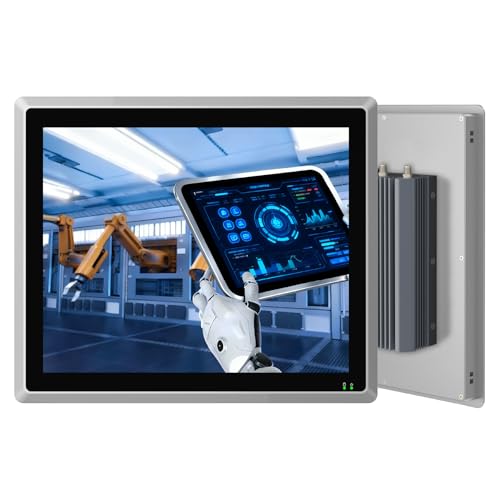
SunKol’s 15-inch embedded panel PC emphasizes a fanless, IP65-rated touch experience with a strong emphasis on heat dissipation and durability. The unit supports auto power-on, multiple USB ports, HDMI output, and dual LAN capabilities. Its processor and memory configuration are oriented toward stable, continuous operation in dusty or high-temperature industrial environments, making it suitable for automation, HMI panels, and control centers.
NORQIN 12.1-Inch Industrial Embedded Panel PC

NORQIN’s 12.1-inch model provides a compact, fanless all-in-one solution with IP65-rated touch, suitable for small kiosks, home automation, and factory deployments. It offers a full set of I/O including USB, HDMI, COM ports, and dual LAN. The fanless design helps maintain silent operation in environments where dust and heat are considerations, while the multi-IO layout supports diverse control and data acquisition tasks.
Buying Guide
- IP Rating and Touch: Look for IP65 or higher front panels for dust and water resistance. Confirm whether the touch is 5-point or 10-point capacitive and if it supports glove or wet touch in industrial contexts.
- Processing Power and OS: Choose a model with a robust processor and Windows OS compatibility (or Linux/Android options as needed) to ensure stability in automation and kiosk tasks.
- Input/Output Density: Assess USB ports, HDMI/Display outputs, COM ports (RS232/RS485), and LAN to ensure compatibility with existing control systems and devices.
- Cooling Strategy: Fanless designs reduce noise and dust intake but ensure adequate cooling for 24/7 operation in hot environments.
- Form Factor: Pick a size that matches your space constraints and field of view requirements. Smaller panels fit tight kiosks; larger panels suit control rooms and signage.
- Reliability Features: Consider devices with 24/7 operation capability, rugged housings, and wide operating temperature ranges for industrial settings.
- Expansion and Customization: Some models offer optional custom OS setups or more advanced I/O configurations—evaluate compatibility with current and future projects.
- Installation Considerations: Check mounting options (VESA, wall, panel), available mounting brackets, and the ease of integration with existing control software.