Best Large Commercial 3D Printers for Scaleable Production
If you need a printer capable of handling sizeable builds or high-volume output, these large-format machines are designed for entrepreneurship, engineering teams, and professional studios. This guide highlights five top options, explaining who each one is best for, and why they stand out in a competitive market. Use the comparison notes to decide which model fits your workflow, worksite constraints, and material needs.
| Product | Brand | Build Volume | Best For |
|---|---|---|---|
| Creality K2 Pro Combo (A) | Creality | 300×300×300mm | Ambitious prototyping and batch printing |
| phrozen Sonic Mega 8K S | phrozen | L12.99×W7.28×H11.81 inches (approx. 330×185×300 mm) | High-volume resin production |
| FLSUN V400 Max | FLSUN | Ø500×550 mm | Massive parts and cosplay production |
| Longer LK5 Pro 3 | Longer | 300×300×400 mm | Open-source flexibility and speed |
| Anycubic Kobra X | ANYCUBIC | 260×260×260 mm | Easy, fast setup for beginners and classrooms |
Creality K2 Pro Combo: Multicolor and High-Speed 3D Printing

The Creality K2 Pro Combo is designed for multi-color and multi-material projects via the CFS Smart Filament System. It supports up to 16 colors and features auto-leveling, active chamber heating, and a 300×300×300mm build volume. Best for professional teams tackling complex assemblies or batch prototypes that require color variation in a single print job. A potential limitation is integration complexity for users new to multi-material workflows.
LulzBot KT-PR0051NA TAZ Workhorse 3D Printer
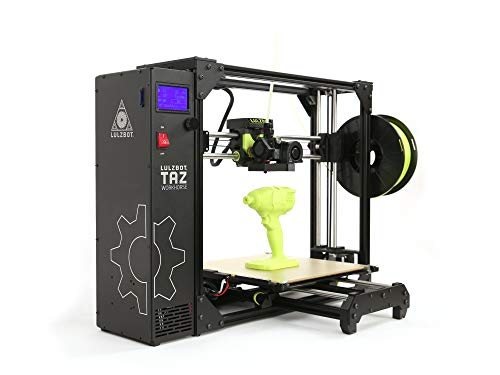
The LulzBot KT-PR0051NA TAZ Workhorse emphasizes premium E3D hot end performance, a belt-driven Z-axis for faster cycles, and X/Y/Z backlash compensation for higher part accuracy. Best for engineering teams needing reliable, repeatable results in a production-like environment. Caution: users should confirm material compatibility with project-specific filaments and any post-processing needs.
phrozen Sonic Mega 8K S: Large-Format Resin Printing

The Sonic Mega 8K S offers massive productivity with a 33 × 18.5 × 30 cm build plate, capable of handling dozens of detailed models quickly. It emphasizes 10x faster printing with ACF & TR300 resin and a space-saving design featuring an accessible lift-up lid. Best for studios needing high-volume resin production with intricate detail. Limitation: resin-based workflows require post-processing and curing equipment to complete parts.
Longer LK5 Pro 3: Fast, Large-Format FDM

The LK5 Pro 3D Printer blends a stable triangular frame with a large 300×300×400 mm build area. It reaches up to 180 mm/s with 0.1 mm precision and features automatic calibration to reduce setup time. Best for makers who want a robust, open-architecture platform and faster output without sacrificing accuracy. Caution: higher-speed operation may require careful bed leveling and vibration management.
Anycubic Kobra X Multicolor 3D Printer

The Kobra X focuses on fast setup and multi-color capabilities with up to 19 colors via built-in color options. It offers 600 mm/s high-speed performance and an easy plug-and-play experience with LeviQ 3.0 automatic bed leveling. Best for classrooms, workshops, or studios needing quick onboarding and color versatility. Limitation: maximum build volume is smaller than some competitors, so large parts may require multiple prints.
Buying Guide
What matters most when choosing a large-format commercial 3D printer?
Build Volume vs. Footprint
Assess your production needs and workspace. A larger build volume enables bigger parts and fewer batch runs, but requires more floor space and potentially higher material costs.
Printing Technology
FDM/FFF printers excel at large plastic parts with lower material costs. Resin printers deliver finer details but require post-processing and resin handling considerations. For multi-color needs, consider systems with fiber or filament management features like the CFS Smart Filament System or built-in color capabilities.
Speed and Throughput
High speeds can reduce production times, yet stability and accuracy matter. Look for synchronized motion systems, robust bed leveling, and reliable extrusion in high-speed modes.
Material Compatibility
Confirm supported materials align with your projects (PLA/ABS, carbon fiber filaments, resins). Some machines handle carbon filaments and high-temp extrusions, while others are optimized for standard plastics.
Automation and Ease of Use
Automatic bed leveling, resume printing after power loss, and user-friendly interfaces reduce downtime and training needs. Consider printers with automatic calibration and quick onboarding features if you scale up production.
Post-Processing Considerations
Resin-based systems require curing and cleaning stations. FDM systems may need enclosure management for printed part quality and safety. Plan for the necessary post-processing workflow in your facility.
totalCost of Ownership
Beyond the upfront price, include filament or resin costs, power consumption, maintenance, and potential accessories. A printer with reliable parts and good service support can lower long-term costs.
FAQ
- Which large-format 3D printer is best for color printing? The Creality K2 Pro Combo supports multi-color printing via the CFS System, making it suitable for color-sensitive prototypes.
- What is the advantage of a resin printer in large formats? Large resin printers like the phrozen Sonic Mega 8K S can deliver high-detail parts quickly, ideal for detailed miniatures or precise components; they require post-processing.
- Do high-speed 3D printers compromise accuracy? Not necessarily; models with advanced motion control and vibration management can maintain accuracy at higher speeds, but setup and calibration are essential.
- Is automatic bed leveling necessary for beginners? It helps reduce setup time and improve first-layer reliability, making beginners and teams more productive.
- What should I consider for a production environment? Look for robust frames, consistent extrusion, easy maintenance, automatic calibration, and strong service support to minimize downtime.
- Can these printers handle carbon fiber filaments? Some models advertise carbon-fiber compatibility; verify nozzle, heat resistance, and chassis design to ensure safe operation.